
Invoice essentials
- Business and client contact details
- Invoice number, issue date, due date, and P.O. number
- Described line items with quantity and rate
- Tax, percentage or fixed discount, shipping, and amount paid
Features
Create professional invoices with automatic totals, reusable client details, invoice templates and PDF downloads. Free to use, with no signup or watermark.
Create invoice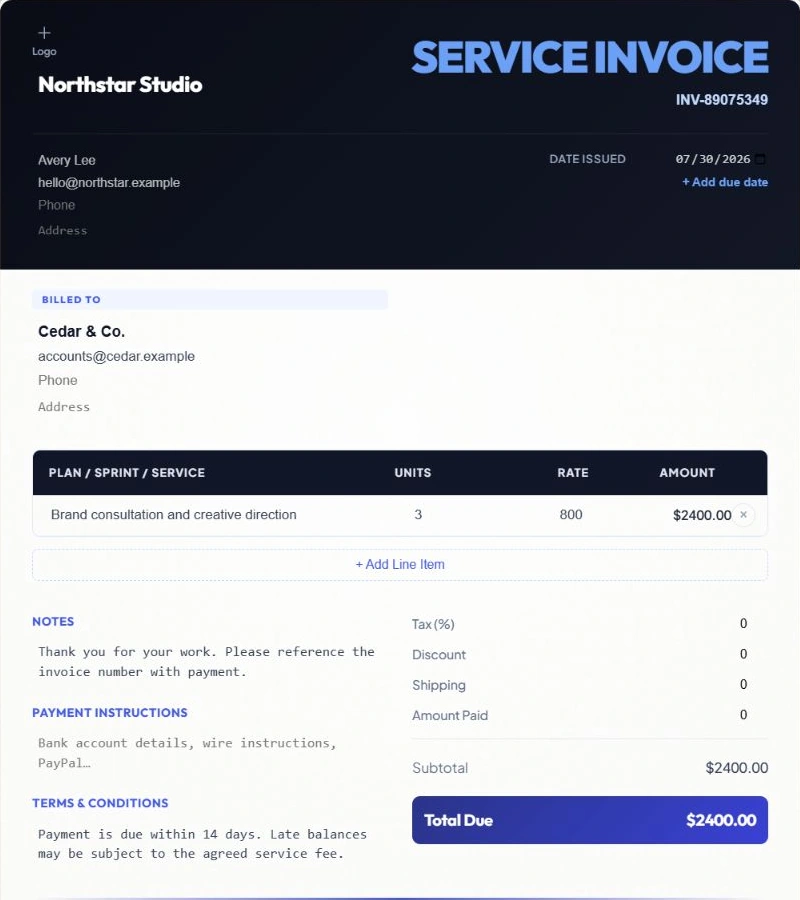
Everything needed to turn work completed into a clear amount due.
On desktop, edit the invoice directly or use the sections on the left. On mobile, fill in Edit, then check Preview at Fit or 100% before downloading.
Line totals, tax, discounts, shipping, payments, and balance due update as you work. Invalid negative or excessive values are flagged before export.
Choose the invoice currency and CatInvoice applies its symbol and decimal rules consistently, including zero-decimal and three-decimal currencies.
Print and PDF download require a sender, a client and at least one described priced item. Save to library checks the same requirements and takes you to missing details.
Professional presentation without turning invoicing into a design project.
Switch layouts without re-entering your information. Your client, items, totals, logo, and payment details carry across.
Add a business name, contact details, tax ID, address, and logo. Your business identity can be reused on future invoices.
Add a due date, purchase order number, shipping address, payment terms, notes, and payment instructions when the job requires them.
Record an amount paid, show the remaining balance, and use the optional payment watermark for paid or partially paid invoices.
Repeat work should take less typing, while every new invoice stays under your control.
After you save an invoice, CatInvoice can suggest that client again and fill their email, phone, billing address, and shipping address.
Choose a previously used line item to restore its description, quantity, and rate, then adjust it for the current job.
Create a fresh copy of a saved invoice with a new invoice number, today’s date, and no payment carried over.
Find invoices by number, client, or business, filter by currency or status, and mark records as Draft, Sent, or Paid.
Local storage, practical backups, and clean documents you can send yourself.
Your working draft saves automatically in this browser. Save to library keeps a separate invoice record; save again after editing it to update the record. A session-only warning means records may be lost on reload or when the tab closes.
Choose Download PDF or More → Print invoice. Exports use A4 pages independently of mobile preview zoom. Review the downloaded file, especially when an invoice spans several pages.
Open a prepared message in your email app, then attach the PDF yourself. CatInvoice does not send mail on your behalf.
In Saved invoices, Download backup exports saved records as JSON; Import backup restores them. Export CSV creates a spreadsheet summary. Save the current draft to the library before backing up.
Use CatInvoice for manual invoicing. Choose a larger platform when your business needs more.
| CatInvoice is a good fit when | Look for a larger platform when |
|---|---|
| You want to make and send occasional or regular service invoices | You need recurring subscription billing or automatic reminders |
| You prefer no signup and are comfortable keeping records on your device | You need cloud sync, team accounts, roles, or approval workflows |
| You want a polished invoice without adopting accounting software | You need bookkeeping, bank reconciliation, payroll, or tax filing |
| You want to download a PDF and send it through your own email | You need built-in card processing or a hosted customer portal |
A line amount is quantity multiplied by rate. The subtotal adds those line amounts, then CatInvoice calculates percentage tax and percentage discounts from that subtotal. A fixed discount replaces the percentage discount; shipping is added to the total, and recorded payments reduce the balance due.
For a $300 subtotal, a 10% tax adds $30 and a 10% discount subtracts $30. Add $5 shipping and the invoice total is $305. With $100 already paid, the balance due is $205. These are example settings in USD.
Review the tax rate, currency, discount type and payment details you entered before exporting. Read the currency and calculation guide.
Pick a layout that keeps your business details, itemized work and amount due easy to read.
Build a record-keeping routine for invoice numbers, payment status, PDFs and backups.
No signup. No subscription. No watermark.