
Track the unpaid balance
Enter the invoice total and payments received. The balance updates for full payments, partial payments and overpayments.
SENT IS A START. PAID IS THE FINISH.
Know what came in, what is still owed and who needs a follow-up. One clear spreadsheet for your invoices and payments.
200 blank rows · .xlsx · No signup · No macros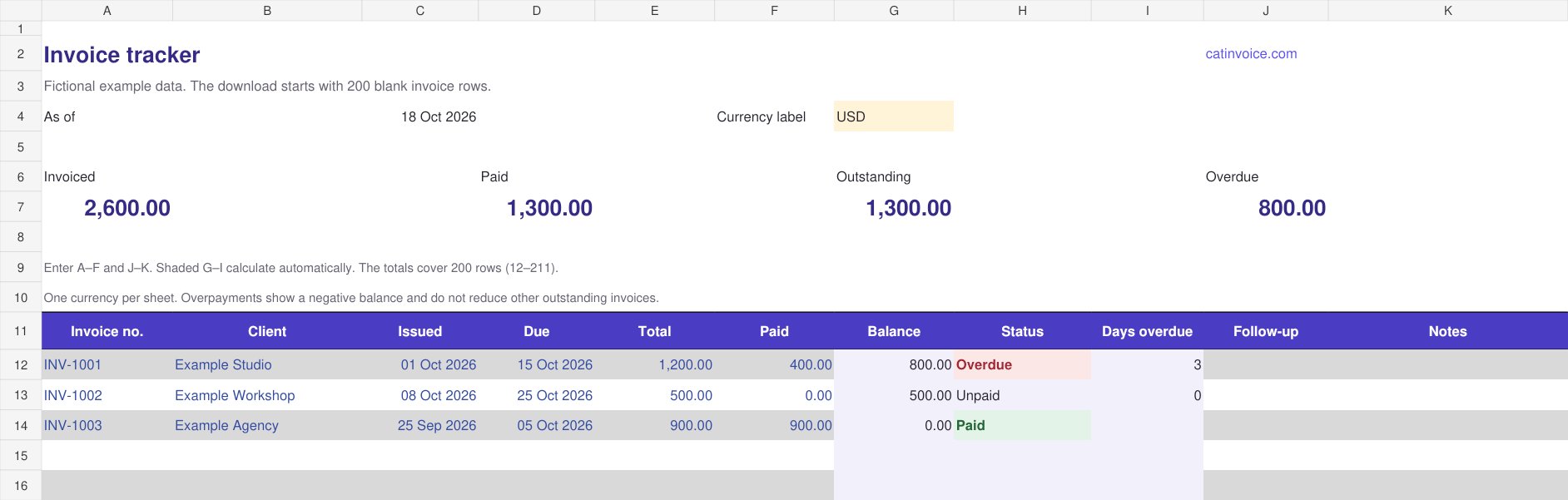
Enter the invoice total and payments received. The balance updates for full payments, partial payments and overpayments.
Due dates and unpaid balances determine the status. A due date of today is still on time. Add your next follow-up date yourself.
Open it in Excel or import it into Google Sheets. Filter the 200 rows, keep a backup and use one currency per workbook.
FROM DOWNLOAD TO A CLEARER RECORD.
One row per invoice. Keep the original PDF alongside your tracker, and update a payment only after you have confirmed it arrived.
Invoice total − payments receivedAn invoice for 1,200 with 400 paid has an 800 balance. An overpayment shows a negative balance rather than disappearing.
Balance > 0 and due date < as-of dateWith the as-of date set to October 18, an unpaid invoice due October 15 is three calendar days overdue. Due today is not overdue.
The As of cell uses =TODAY(), which updates when the spreadsheet recalculates. Replace C4 with a fixed date for a snapshot. If the date stays stale in Excel, check that calculation is set to Automatic.
Missing amounts or due dates are labelled in the Status column. Outstanding totals include positive balances only. Overpayments do not cancel out unrelated unpaid invoices.
Download the .xlsx file first. In Google Sheets, choose File → Import → Upload, select the file, then choose Create new spreadsheet. Check the imported dates, formulas and filters with a sample invoice before entering real records.
You keep your own copy. This is an Excel download, with no public shared sheet and no connection to your CatInvoice records. Google’s Excel import instructions explain the available import options.
Use the spreadsheet when you want a separate list you can keep on your computer, import into a cloud spreadsheet or share with a bookkeeper. It does not create an invoice PDF or import CatInvoice backups.
For the invoice itself, create a free PDF in CatInvoice. Saved invoices stay in that browser, so export a backup from Saved invoices when needed. Neither workflow connects to your bank or sends automatic reminders.
Need the deadline first? Use the invoice due date calculator. For folder names, backups and a weekly review routine, read how to track invoices and payments.
Yes. Download, edit and share the spreadsheet without an account, email address, payment or subscription. You can use it for your own business or adapt it for a client. Attribution is welcome, but optional.
Download the Excel file, open Google Sheets, choose File → Import → Upload, then select the workbook and create a new spreadsheet. Check the imported dates, formulas and filters before using it for real records. There is no shared Google Sheet containing your data.
No. Enter invoice totals and payments yourself. The file does not connect to banks, send reminders, sync with CatInvoice or change your saved invoices. If you upload it to a cloud spreadsheet service, that service stores your copy.
Use one currency per copy. The currency cell is a label, not an exchange-rate calculator. Keep separate workbooks for USD, GBP, PKR or other currencies so the totals stay meaningful. The template displays amounts to two decimal places.
An invoice is overdue when it has a positive unpaid balance and its due date is earlier than the As of date. Due today is not overdue. The As of cell uses TODAY(), which updates when your spreadsheet recalculates. You can replace it with a fixed date for a snapshot.
The supplied formulas and totals cover rows 12–211. For another batch, make a fresh copy. If you extend the workbook, extend its table, formulas, summary ranges, validation and formatting together, then check the totals.
You can edit and share the template freely, including with clients. If you run a freelancer resource list or teach small-business invoicing, you are welcome to link to this page. Attribution is optional.
No email gate. No paid upgrade. Keep your own copy.